

I’ve been using the Wyze Battery Video Doorbell for two weeks, and it’s the best option under $100

Wyze Battery Video Doorbell: Specs
Camera resolution: 1536 x 1536. Up to 20 fps in daytime, 15 fps at nighttime
Field of view: 150 x 150-degrees
Night vision: Color Night Vision, 850nm IR Lights
Size: 5.71 x 1.85 x 1.14-inches, 7.58 ounces
Battery Life: Up to 6 months with normal use
Weather proofing: IP65 “weather” resistance
Wi-Fi: 802.11 b/g/n Wi-Fi 6 at 2.4GHz
The Wyze Battery Video Doorbell is the company’s third doorbell that doesn’t need always-on power, and this latest generation boasts a higher resolution camera, head-to-toe video and a microSD card slot for continuous recording, all for less than $100. And, it features AI-powered person and package detection.
Wyze Battery Video Doorbell: Price & availability
Wyze announced the Wyze Battery Video Doorbell in October 2025 and is currently available directly from Wyze, Amazon and Best Buy.
The Wyze Battery Video Doorbell is the same price and color — $65.98 and black — no matter where you buy it. If you plan on using the Wyze Battery Video Doorbell as a wired doorbell with constant power, you’ll want to pick up one of Wyze’s microSD cards to take advantage of its continuous recording capabilities.
Wyze Battery Video Doorbell review: Design
There’s nothing groundbreaking about the design of the Wyze Battery Video Doorbell. It reminds me a lot of any generation Nest Doorbell, only less refined. The front of the case is black, silver along the sides.
The front face has two circles stacked atop the 5.71-inch tall housing. The top circle is the camera, while the bottom circle is the doorbell button that’s surrounded by a small light-up ring.

On the backside of the doorbell is where you’ll find two screws to connect wired power from an existing doorbell, along with a USB-C port for recharging, and a microSD card slot. There are two small rubber coverings that go over the charge port and microSD card slot to keep the doorbell’s IP65 weatherproof rating.
The USB-C port is a welcome addition to any gadget, but even more so a video doorbell that you (hopefully) won’t have to charge all that often. By ditching the microUSB port, you no longer have to keep tabs on a charging cable you don’t need but every once in a while.

Included in the box is everything you’ll need to install the doorbell, which includes a flat mount, a corner mount if you need to angle the doorbell, along with screws, wire nuts, extension wires and a USB-C charging cable.
Inside the Wyze Battery Video Doorbell is a 6,400 milliamp-hour battery that’s partially charged out of the box. Wyze states it takes up to 6 hours to fully charge the battery using a standard 10W USB-C wall adapter.
Wyze Battery Video Doorbell review: Installation
After charging the doorbell and connecting it to your Wyze account, the real work begins depending on how you plan on powering the doorbell. The setup process for the doorbell in the Wyze app will walk you through connecting it to your Wi-Fi network, updating the firmware and then the rest of the install.

The installation process itself is simple so long as you’re somewhat comfortable with DIY projects and using the doorbell in a wireless fashion. However, if you’re going to replace your existing hardwired doorbell with the Wyze Battery Video Doorbell, you’ll want to be comfortable with limited electrical work.
In short, you’ll want to have enough confidence to turn off the breaker to your doorbell’s power, connect two wires to the back of the Wyze Battery Video Doorbell, and then turn it back on. (The Wyze Battery Video Doorbell is compatible with 12-24V doorbell transformers).

If that doesn’t make sense to you or you find it intimidating, call a handyman.
Once you’ve figured out how you’re going to power the doorbell, the rest of the process consists of drilling a couple of holes into the mounting surface and using the included screws (along with anchors if appropriate) to secure the doorbell to its mount.

Again, the app walks you through the entire process. For me, it took about 10 minutes from unboxing to having the doorbell installed and sending me alerts.
One more note about a wired installation if you’re connecting the doorbell to your existing chime — you’ll need to purchase and install the $18 Wyze Chime Controller in order for the doorbell to control the chime.
Wyze Battery Video Doorbell review: Video quality and features
One of the upgrades the Wyze Battery Video Doorbell has over its predecessors is that it now captures video at a resolution of 1536p. That’s a slight step up from the Wyze Video Doorbell Pro’s 1440p resolution.
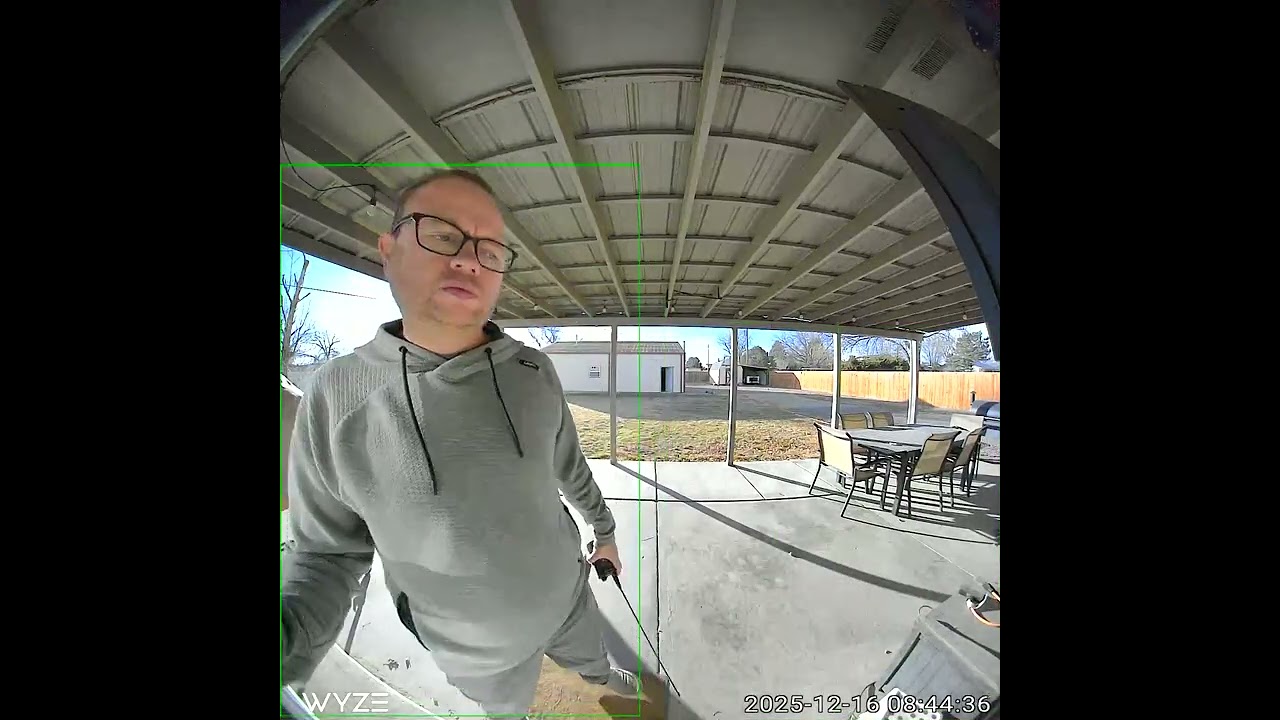
Better yet, it captures footage with a 150-degree field of view that’s big enough to nearly see what’s directly under the doorbell and what’s high above it, leaving little room for anyone or anything to hide.
It doesn’t see all the way to the floor directly underneath the doorbell. There’s a small step underneath where I have it installed on my back porch that’s not seen in any pictures or videos until it gets out to the edge of the frame, so if someone were to leave a package there it wouldn’t be visible.
That said, I’m impressed by the wide field of view and overall video quality. There’s some pixelation when objects are moving, especially the closer they are to the camera, but it’s not a deal breaker. I’m still able to see who or what is being recorded. The video clarity really shines when someone is standing still while they wait for you to answer the door; it looks fantastic.
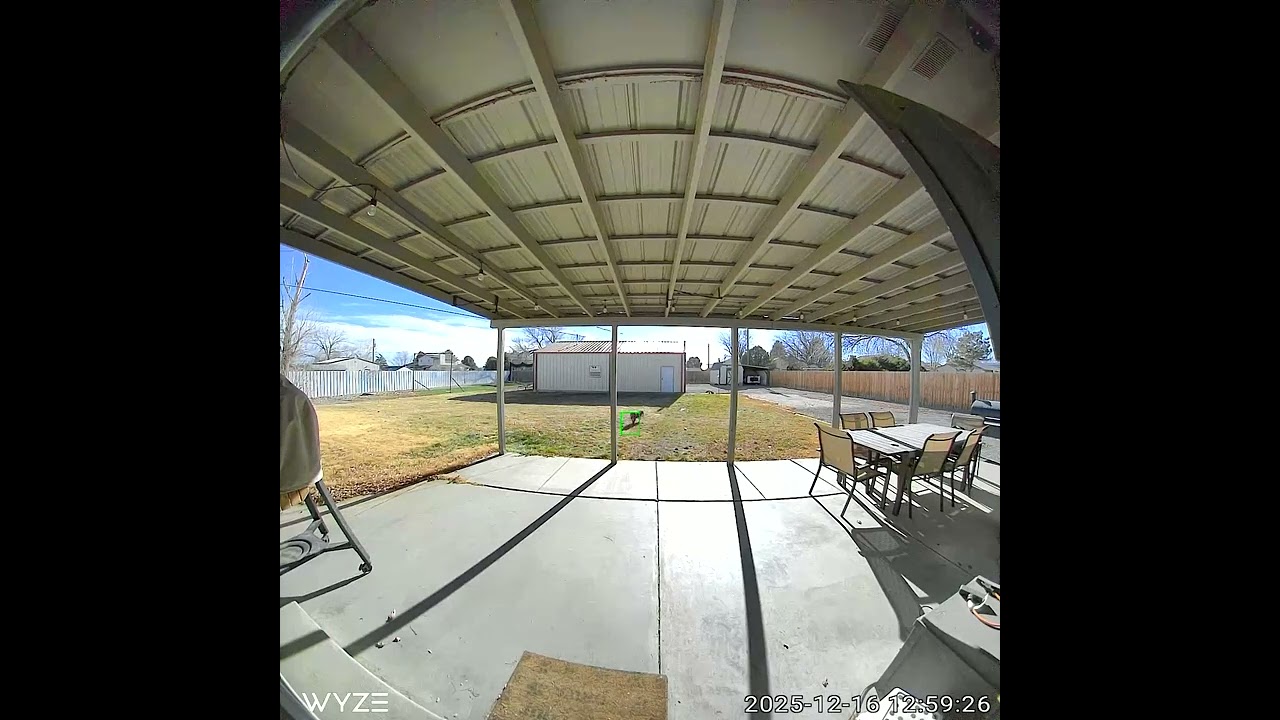
If anything the color quality could be a touch better, with colors often looking washed out or muted, especially during the early part of the day when the sun is shining directly at the doorbell.
There are two different views available from the Wyze Battery Video Doorbell in the app. There’s a standard view that’s perfect for seeing who is at your door, and there’s also a wide-angle feed that shows the full 150-degree viewing area. I prefer the latter option, but I’m certain others will prefer the more zoomed in view; options are good.
When someone presses the doorbell’s button, instead of getting yet another push notification that’s far too easy to ignore, your phone starts ringing as if you’re getting a phone call. It’s a surefire way to know when someone is at the door. I can’t tell you how many times I’ve heard or seen a Ring alert on my phone and just assumed it was errant motion or a package being delivered, only to later realize that someone actually rang the doorbell. (To be fair, Ring has a similar feature).
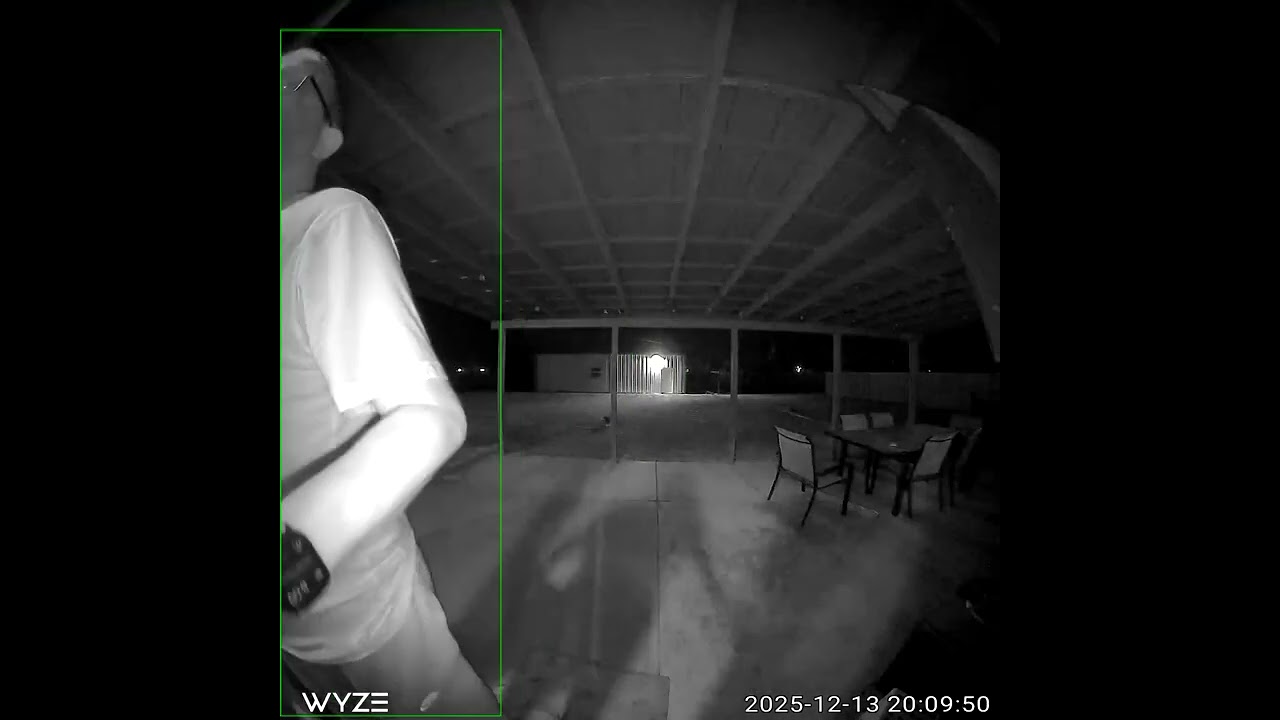
The Wyze Battery Video Doorbell can capture color video at night, or use its IR lights to capture black and white video. I originally set the camera’s Night Vision Mode to Auto, assuming it’d switch between the two modes depending on how much light was available, but for nearly two weeks it only captured black and white video. Only after setting the Night Vision Mode to Off did I start to see color video captured at night. Both types of video captured at night look good.
Wyze Battery Video Doorbell review: AI has entered your doorbell
A few days into testing, Wyze activated its Cam Unlimited Pro plan on my account, which enables the company’s Descriptive Alerts feature.
When enabled, instead of getting an alert that there was motion on your back porch, or that a person was detected, Descriptive Alerts gives you so many more details. For example, it was common to get an alert that there were two dogs playing on my porch or in the grass.

And so, one sunny afternoon when my wife hung a dress to dry on our back porch, I received a few alerts letting me know that a dress hanging from the roof was blowing in the wind. On another occasion I got an alert that the shadow of the dress was moving. Crazy, right?!
As a longtime Ring user who hadn’t paid attention to features the company rolled out in the last few months, I was quite impressed. So impressed, my camera roll is currently full of screenshots of alerts and their eerily accurate and amusing descriptions. I subsequently enabled Ring’s AI features on my account and have to say, Ring’s alerts are helpful, but not nearly as descriptive or informative. They’re a lot more generic, with alerts saying stuff like “A person is walking on your driveway” without any type of detail.

Descriptive Alerts aren’t perfect, with the most common mistake I experienced being the alert identifying the wrong color of shirt or jacket I was wearing, sometimes just minutes apart. For example, one day I wore a green hoodie, and the first time I walked by the camera I got an alert saying a person wearing a green jacket walked by. Not five minutes later when I walked by the doorbell again, it said a person wearing a gray jacket walked by.
If I wasn’t home and I saw those alerts without looking at the videos, I would assume more than one person was in my backyard.

As is the case with all things AI, it’s always a good idea to treat descriptive alerts with some skepticism.
One more AI related gripe: After getting access to Wyze’s Friendly Faces feature, I enrolled my own face through a process that’s similar to turning on Face ID or Face Unlock and expected to start receiving alerts letting me know I had been seen in the backyard.
However, only once have I received an alert that indicated the doorbell recognized me while I was standing directly in front of it for an extended amount of time, despite walking past the doorbell a few dozen times.
Wyze Battery Video Doorbell review: Video storage and plans
In order to take full advantage of all the features Wyze has to offer, including Descriptive Alerts, AI video search, 60 day cloud storage and emergency dispatch, you’ll need to sign up for its Cam Unlimited Pro subscription at $19.99 a month or $199 a year, covering all of your Wyze cameras. That’s comparable to both Ring and Nest, which also charge the same amount to use their AI features.

Alternatively, Wyze’s Cam Plus subscription service is $2.99 a month or $19.99 a year for a single camera, and includes 14 day cloud history along with smart alerts for people, pets, packages and vehicles.
For those with more than one Wyze camera, the Cam Unlimited plan will set you back $9.99 a month or $99.99 a year. It includes everything in the Plus plan, with the addition of unlimited cameras and the Friendly Faces feature.
Wyze Battery Video Doorbell review: Battery life
Wyze estimates the battery will last up to 6 months, in ideal conditions. After two weeks, I can confidently say that 6 months isn’t going to happen, even in what I’d consider a medium traffic environment. In two weeks, the battery has gone from 100% to 73%. At that rate, it’s going to last close to 5 weeks.

Admittedly, I’m sure part of the issue is just how cold it was outside here in Colorado for that first week of testing, but the second week we’ve seen unseasonably warm days.
Wyze Battery Video Doorbell review: Verdict
At $66, it’s hard to find many faults in Wyze Battery Video Doorbell, especially when you look at it in the silo of Wyze’s own lineup. The $100 Wyze Video Doorbell Pro includes a wireless chime, but lacks local storage and has a lower video resolution.
Outside of Wyze’s lineup, the $99 Ring Battery Doorbell and $69 Blink Video Doorbell are close competitors when it comes to cost, although both have a lower 1440p resolution.
Blink’s solution uses two AA batteries for an estimated 2 years of battery life, while the Ring Battery Doorbell is nearly a 1:1 match in terms of features (save video quality and local storage) with a higher $4.99 monthly subscription fee for a single camera.
For someone who isn’t already heavily invested in a home security camera platform, the Wyze Battery Video Doorbell’s features and performance make a compelling and attractive argument, especially for the price.
Source link
